Automated Docker Updates with Renovate, n8n, and AI
I used to use Watchtower to yolo update for all my homelab containers. But with them archiving the project and me starting to actually rely on some of my self-hosted apps, I needed some other method for updating things. Fortuantely I came across this video from Christian Lempa that was using some different ways of updating stacks and thought I’d give it a try.
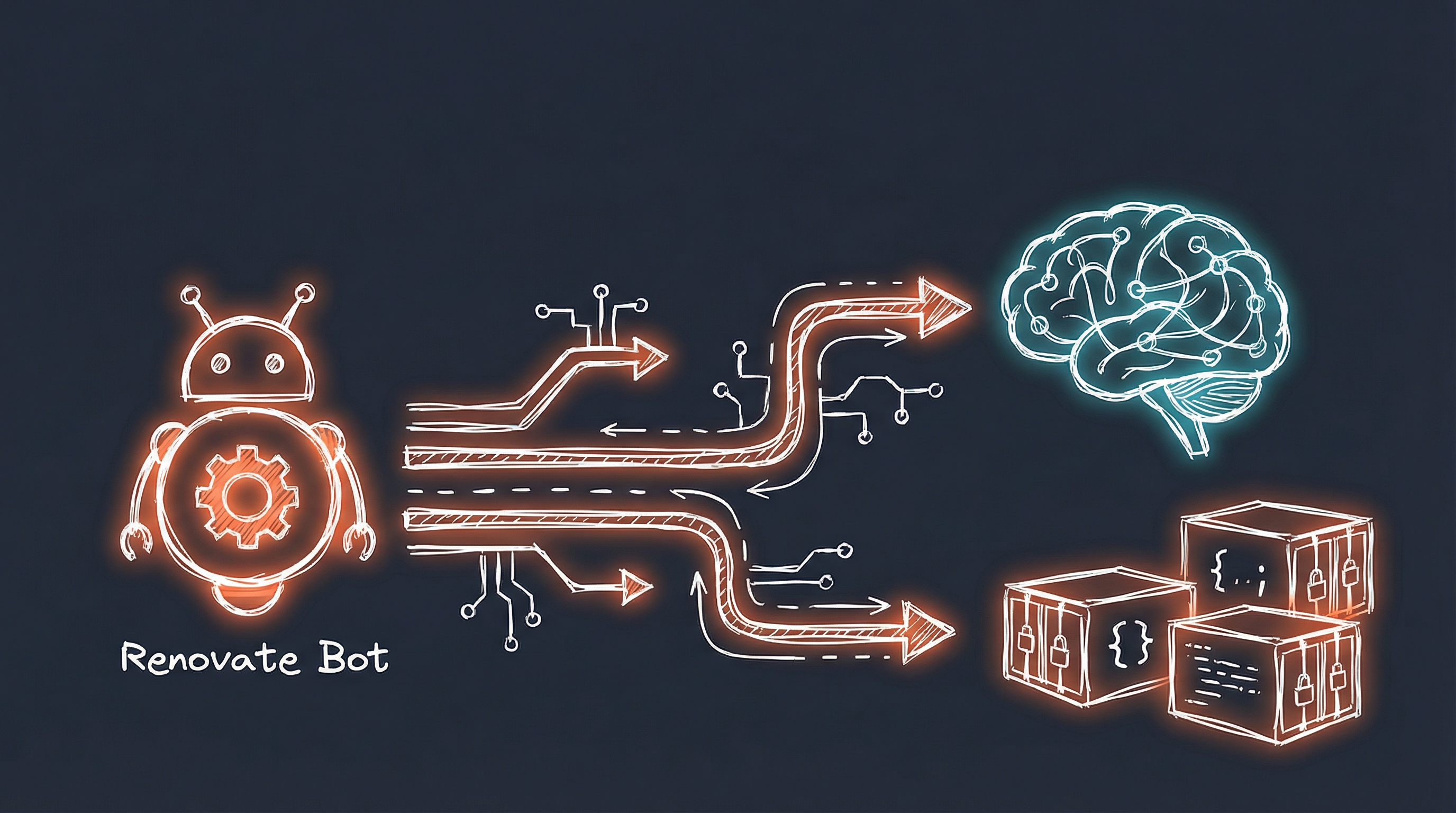
I built an automation based on that video that uses Renovate Bot to detect updates, n8n to orchestrate the workflow, and OpenAI’s GPT-4o-mini to assess risk. Safe updates merge automatically. Risky ones get flagged for review. The entire system costs $1-2 per month.
The Problem
Before automation:
- Auto-update everything (and pay the conseqences)
- Read changelogs (sometimes))
- Assess risk (breaking changes? database migrations?)
After automation:
- Automatic detection of new versions
- Smart(er) risk assessment
- Auto-merge for “safe” updates
- Manual review for risky changes
- Integration with existing GitOps workflow
The Solution
Stack:
- Renovate Bot - Detects dependency updates, creates PRs
- n8n - Workflow orchestration and API integration
- OpenAI GPT-4o-mini - AI-powered risk assessment
- GitHub - Source control and PR management
- Portainer - GitOps deployment (5-minute polling)
- Discord - Notifications
Cost: ~$1-2/month (OpenAI API usage)
How It Works
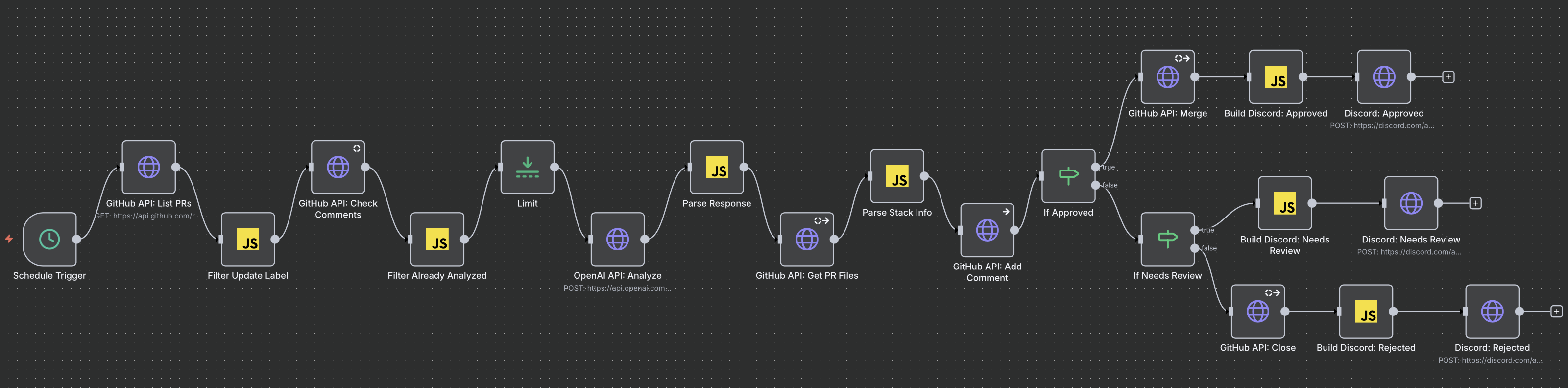
The complete flow:
1. Renovate Bot
   ↓ Scans docker-compose.yml files
   ↓ Detects new versions
   ↓ Creates PRs with "update" label

2. n8n Workflow (polls every 10 min)
   ↓ Lists PRs with "update" label
   ↓ Extracts PR diff and metadata
   ↓ Sends to OpenAI for analysis

3. OpenAI GPT-4o-mini (~$0.01/analysis)
   ↓ Analyzes changelog for breaking changes
   ↓ Assesses risk (LOW/MODERATE/HIGH)
   ↓ Returns: APPROVED/NEEDS_REVIEW/REJECTED

4. Decision Tree
   ├─ APPROVED (low risk)
   │  ↓ Auto-merge PR
   │  ↓ Discord: "Auto-merged, deploying in 5 min"
   │
   ├─ NEEDS_REVIEW (moderate risk)
   │  ↓ Leave PR open
   │  ↓ Discord: "Review needed" + link
   │
   └─ REJECTED (high risk)
      ↓ Close PR
      ↓ Discord: "Rejected" + reason

5. Portainer GitOps (polls every 5 min)
   ↓ Detects merged PR
   ↓ Pulls new docker-compose.yml
   ↓ Runs: docker-compose pull && up -d
   ↓ Container updated automatically
Prerequisites
- Docker homelab with compose files in Git
- GitHub repository
- n8n instance (self-hosted or cloud)
- OpenAI API key
- Portainer with GitOps enabled (optional but recommended)
Setup Part 1: Renovate Bot
Renovate is a GitHub App that scans your repository for dependency files and creates update PRs.
Install Renovate:
- Go to https://github.com/apps/renovate
- Install for your repository
- Choose “Scan and Alert” mode
- Merge the onboarding PR
Create renovate.json in repository root:
{
  "$schema": "https://docs.renovatebot.com/renovate-schema.json",
  "extends": ["config:recommended"],
  "timezone": "America/Chicago",
  "schedule": ["after 2am and before 4am"],
  "labels": ["update"],
  "prConcurrentLimit": 3,
  "enabledManagers": ["docker-compose"],
  "docker-compose": {
    "enabled": true,
    "pinDigests": true
  },
  "separateMajorMinor": false,
  "packageRules": [
    {
      "description": "Pin databases to minor versions only",
      "matchPackageNames": ["postgres", "mariadb", "redis"],
      "rangeStrategy": "pin",
      "major": { "enabled": false }
    },
    {
      "description": "Schedule Tailscale for weekends only",
      "matchPackageNames": ["tailscale/tailscale"],
      "schedule": ["every weekend"]
    }
  ],
  "recreateWhen": "auto"
}
Key settings:
schedule: Creates PRs during off-hours (2-4 AM)labels: Adds “update” label for n8n filteringprConcurrentLimit: Limits PRs to prevent spampinDigests: Locks to specific image hashesrecreateWhen: "auto": Prevents infinite PR recreation after rejection- Package rules: Pin databases (never auto-update major versions), schedule risky updates for weekends
Test: Wait for next scheduled run or trigger manually via Dependency Dashboard.
Setup Part 2: n8n Workflow
n8n orchestrates the analysis and decision-making.
High-level workflow structure:
Schedule Trigger (every 10 min)
→ GitHub: List PRs
→ Filter: Has "update" label
→ GitHub: Get comments (check if already analyzed)
→ Filter: Skip if already analyzed
→ GitHub: Get PR diff
→ OpenAI: Analyze changes
→ Parse Response
→ If: Approved?
   ├─ YES → GitHub: Merge → Build Discord: Approved → Discord: Send
   └─ NO → If: Needs Review?
            ├─ YES → Build Discord: Needs Review → Discord: Send
            └─ NO → GitHub: Close → Build Discord: Rejected → Discord: Send
Learning: Build Discord messages AFTER GitHub actions, not before.
No:
Parse Response → Build Discord → GitHub Close → Discord Send
                  (says "closed")  (might fail)

Yes:
Parse Response → GitHub Close → Build Discord: Rejected → Discord Send
                  (confirms)     (only if succeeded)
If the GitHub action fails, you don’t want Discord claiming success.
Build Discord Code Node example:
// Runs AFTER GitHub Close (has succeeded)

// Get analysis from Parse Response node
const analysis = $('Parse Response').item.json.analysis;
const pr = $('Parse Response').item.json.pr;

// Build message
const message = `:no_entry: **Update Rejected**\n\n` +
  `**PR #${pr.number}**: ${pr.title}\n` +
  `**Risk**: ${analysis.risk}\n` +
  `**Reason**: ${analysis.recommendation}\n\n` +
  `PR has been closed.`;

return {
  json: {
    username: "Renovate Bot",
    content: message
  }
};
Discord HTTP Request settings:
- Method: POST
- URL: Your Discord webhook URL
- Body Content Type: JSON
- Body: `` (passes through complete object from Build node)
Setup Part 3: OpenAI Risk Assessment
The AI prompt is critical for good decisions.
My production prompt:
You are a Docker infrastructure expert analyzing a dependency update PR.

PR Title:
PR Body:
Changes:

Analyze this update and provide a JSON response with your risk assessment.

CRITICAL RULES:
1. Database major version updates (postgres, mariadb, redis) = ALWAYS REJECTED
2. Breaking changes mentioned in changelog = REJECTED
3. Major version jumps (1.x → 2.x) = NEEDS_REVIEW unless it's a patch
4. Security patches = APPROVED
5. Minor/patch updates with no breaking changes = APPROVED

Respond ONLY with valid JSON (no markdown, no explanation):
{
  "decision": "APPROVED|NEEDS_REVIEW|REJECTED",
  "assessment": "brief description of what changed",
  "changes": "key changes from the update",
  "breaking": "any breaking changes mentioned (or 'none')",
  "risk": "LOW|MODERATE|HIGH",
  "impact": "potential impact on the service",
  "recommendation": "specific recommendation"
}
OpenAI API configuration:
- Model:
gpt-4o-mini(~$0.01 per analysis) - Temperature: 0.3 (lower = more consistent)
- Max tokens: 500 (sufficient for decision)
Parse the response:
const aiResponse = $input.item.json.choices[0].message.content;

// Clean up markdown code blocks if present
const cleanResponse = aiResponse.trim()
  .replace(/```json\n?/g, '')
  .replace(/```\n?/g, '');

const analysis = JSON.parse(cleanResponse);
Decision Logic in Action
APPROVED (Auto-Merge):
ghcr.io/immich-app/immich-server:v1.95.1 → v1.95.2
- Patch update
- Bug fixes only
- No breaking changes
→ Auto-merged within 10 minutes
NEEDS_REVIEW (Manual):
ghcr.io/authentik/server:2024.6.4 → 2024.10.1
- Several minor versions jumped
- Configuration changes mentioned
- Moderate risk
→ Discord notification with PR link
→ Manual review before merging
REJECTED (Auto-Close):
postgres:16 → postgres:18
- Major database version
- High risk of data compatibility issues
- Requires migration planning
→ PR closed automatically
→ Won't recreate for minor updates (16.1, 16.2, etc.)
→ New PR created if 18.1 released
Setup Part 4: Portainer GitOps
Connect Portainer stacks to Git repository for automatic deployment.
For each Docker Compose stack:
- Portainer → Stacks → Add Stack → Git Repository
- Repository URL:
https://github.com/user/repo - Repository reference:
refs/heads/main - Compose path:
stacks/service-name/docker-compose.yml - GitOps updates: Enabled
- Polling interval: 5 minutes
- Re-pull image: Enabled
How it works:
Every 5 minutes, Portainer:
- Polls GitHub for commit changes
- If main branch changed, pulls new compose file
- Runs
docker-compose pull(downloads new images) - Runs
docker-compose up -d(updates changed containers)
Timeline after auto-merge:
- T+0: n8n merges PR
- T+5 min: Portainer detects change
- T+6 min: New container deployed
Real-World Examples
Patch update (auto-merged):
PR: Update linuxserver/radarr to v5.14.0
Analysis:
- Minor bug fixes
- Performance improvements
- No breaking changes
Decision: APPROVED (LOW risk)
Discord: "✅ Auto-merged: Radarr v5.14.0 - Deploying in 5 min"
Minor update with config changes (needs review):
PR: Update authentik to 2024.10.1
Analysis:
- New OIDC features
- Configuration file format changed
- Migration guide provided
Decision: NEEDS_REVIEW (MODERATE risk)
Discord: "⚠️ Review needed: Authentik 2024.10.1 - Config changes"
Action: Manually reviewed migration guide, tested locally, merged
Database major version (rejected):
PR: Update postgres:16 to postgres:18
Analysis:
- Major version upgrade
- Requires pg_upgrade
- Potential data compatibility issues
Decision: REJECTED (HIGH risk)
Discord: "🚫 Rejected: Postgres 16→18 - Major DB upgrade requires planning"
Troubleshooting
Duplicate Discord Notifications
Problem: Same PR analyzed multiple times, duplicate messages.
Cause: Filter node not detecting existing bot comments correctly.
Solution: Update Filter Already Analyzed code:
// Get ALL comments from Check Comments node
const allComments = $('GitHub API: Check Comments').all();

// Check if ANY comment contains our bot signature
const hasAnalysis = allComments.some(item => {
  const comment = item.json;
  return comment && comment.body &&
    comment.body.includes('🤖 **AI Analysis Complete**');
});

if (hasAnalysis) {
  return null;  // Skip - already analyzed
}

// Pass PR data through
const allPRs = $('Filter Update Label').all();
const currentIndex = $itemIndex;
return { json: allPRs[currentIndex].json };
AI Making Bad Decisions
Symptom: Auto-merging risky updates or rejecting safe ones.
Solution: Tune the prompt for your specific stack.
Example adjustment:
Add to prompt: "Updates to Immich are generally safe and should be
APPROVED unless major version (1.x → 2.x) or explicit BREAKING tag."
Monitor for 1-2 weeks after tuning.
PRs Recreating After Closure
Cause: Wrong recreateWhen setting.
Solution: Use "recreateWhen": "auto" in renovate.json.
Behavior:
"auto"(recommended): Closed PRs stay closed unless new major version"never": No PRs recreate (too restrictive)"always": All PRs recreate (infinite loop - avoid)
Cost Breakdown
OpenAI API usage:
- ~$0.01 per PR analysis
- Average: 100 PRs per month
- Total: ~$1.00/month
How to reduce costs:
- Group updates:
"packageRules": [{
  "groupName": "minor updates",
  "matchUpdateTypes": ["minor", "patch"]
}]
Result: 10 updates = 1 PR = $0.01 instead of $0.10
- Increase schedule gap:
"schedule": ["after 2am and before 4am every 2 days"]Result: 50 PRs/month instead of 100
- Filter before analysis: Skip documentation-only updates, digest pins
Limitations
When this doesn’t work:
- Non-Docker dependencies (npm, pip, etc.) - Renovate supports them but you need different analysis prompts
- Custom-built images - Renovate can’t detect internal changes
- Complex database migrations - AI can’t test migrations, only flag them
- Multi-repo dependencies - Renovate works per-repo
What you still need to do:
- Review NEEDS_REVIEW PRs manually
- Test database migrations before merging
- Monitor deployment success in Portainer
- Occasionally audit AI decisions
Getting Started
Week 1: Setup
- Install Renovate GitHub App
- Create renovate.json with basic config
- Import n8n workflow
- Configure GitHub/OpenAI credentials
- Test with manual trigger
Week 2: Monitor
- Let automation run for 1 week
- Review all decisions (approved, rejected, needs review)
- Tune AI prompt based on false positives/negatives
- Adjust package rules for your stack
Week 3: Trust
- Enable auto-merge for more services
- Set up Portainer GitOps if not already
- Configure Discord notifications
- Document any custom package rules
Week 4: Optimize
- Review OpenAI costs
- Group updates to reduce API calls
- Adjust schedule if too many PRs
- Share what you learned
Conclusion
This automation saves me 2-4 hours per week for $1-2 per month. The setup took a weekend, but it’s been running reliably for a few months with minimal intervention.
The key insight: Most updates are safe and don’t need human review. AI can assess risk better than scanning changelogs manually. The occasional false positive is worth the time savings.
If you’re managing a homelab with dozens of services, this approach scales much better than manual updates.
AI Influence Level: AIL2
Resources: